
Introduction to My Biz App
What is My Biz App?
My Biz App is a mobile application designed to connect users with a business’s information and services in a fast and centralized way.
From the app, users can:
-
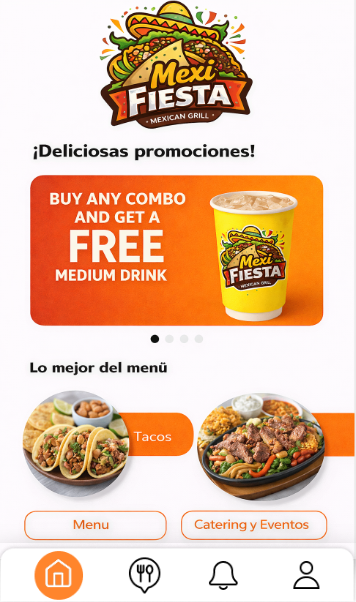
View promotions and featured content.

-
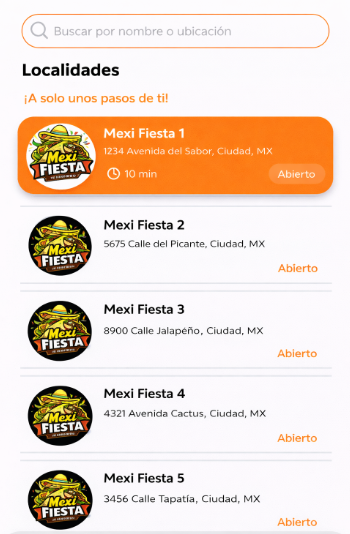
See locations/branches with address, hours, and contact information.
-
Access the menu.

-
Access the “Order Online” button.
-
Submit Catering and Events requests.

-
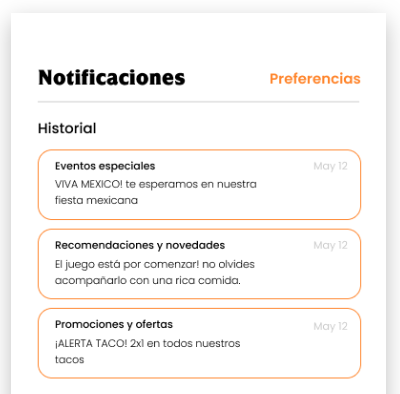
Receive and manage notifications (promotions, news, events, and updates).
Manual Objective
This manual aims to:
- Explain the functional use of My Biz App for end users.
- Provide step-by-step guidance for the main flows: registration, login, navigation, locations, menu, requests, and notifications.
- Document available screens and options to ensure consistent use of the application.
- Serve as a reference for support, training, and feature validation.
Departments Involved
Typical teams that interact with the app or the information displayed in it:
- Operations / Branches
- Hours, address, phone numbers, and information for each location.
- Marketing
- Promotions, campaigns, featured content (Home), and user communications.
- Customer Support / Service
- User inquiries, access support, incident handling, and general guidance.
- Sales / Catering
- Handling and follow-up of Catering and Events requests.
- Administration / Management
- Overall review of digital presence, guidelines, and approvals.
- IT / Product
- Maintenance, release of changes, technical configuration, and platform support.
Project Scope
Includes
- User experience in My Biz App:
- Registration, login, and password recovery.
- Home view (promotions/featured content).
- Location lookup (map, hours, call).
- Menu viewing and access to “Order Online”.
- Submission of Catering and Events requests.
- Notification receipt and preferences.
- Profile management (privacy, terms, password change, account deletion, logout).
Does Not Include
- Internal processes outside the app (e.g., catering logistics/production).
- Payments or transactions handled by external platforms (e.g., “Order Online” systems).
- Full legal policies (only referenced; legal content is defined by the business).
Prerequisites
For the End User
- Compatible mobile device (iOS/Android, depending on publication).
- Internet connection (Wi-Fi or mobile data).
- Account created in the app (email and password).
- Recommended permissions enabled:
- Notifications (to receive promotions and alerts).
- Location (optional, to help find nearby locations).
For the Business (Content Available in the App)
- Loaded and up-to-date information:
- Locations (address, phone number, hours).
- Menu and/or “Order Online” URL.
- Promotions or featured content (if applicable).
- Notification category configuration (if used).