
6. Identity Capture (Facial Biometrics)
Navigation
- 6. Identity Capture
- 6.1 When is enrollment done?
- 6.2 Step-by-step (enrollment)
- 6.3 Rules for a correct capture
- 6.4 Common errors and prevention
6. Identity Capture (Facial Biometrics)
6.1 When is enrollment done?
- When onboarding a new employee (first time).
- When the operation authorizes a “re-enrollment” (due to relevant physical changes or previous poor quality).
Note: Re-enrollment is only allowed with supervisor authorization (per internal policy).
6.2 Step-by-step (enrollment)
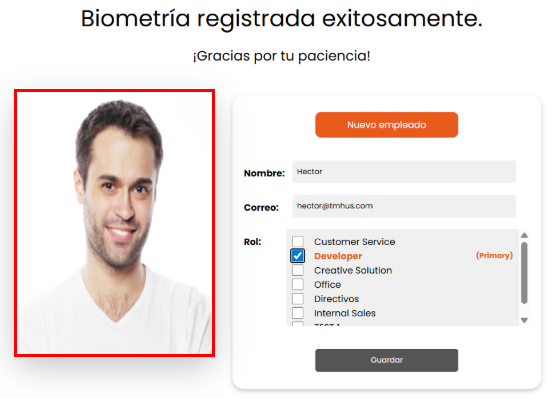
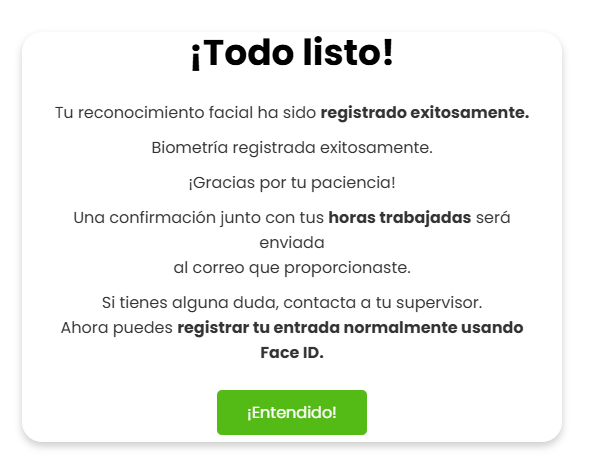
- Go to the Biometric Enrollment / Enrollment module.





6.3 Rules for a correct capture
- Front-facing lighting (ideal: natural light or white light).
- Avoid backlighting (windows or lights behind the user).
- Full face visible (forehead, eyes, nose, mouth).
- No movement (avoid blur).
- Clean lens.
6.4 Common errors and prevention
- Face not detected: move closer/center the face, remove obstructions.
- Blurry image: stabilize the tablet, retry without movement.
- Too dark/backlit: change the user’s position or the capture point setup.